

Keeping your photos safe and organized doesn’t have to cost a fortune. I know a lot of people get overwhelmed thinking they need expensive scanners, cloud subscriptions, or fancy computers to start, but you truly don’t. There are tons of budget-friendly (and even free!) ways to get your photo collection in order. Here are my favorite affordable tools and tips for protecting your memories without overspending.
📸 Scanning Photos on a Budget
You don’t need to buy an expensive scanner to get started. There are several free or low-cost ways to digitize your prints and start creating digital backups.
1. FamilySearch Center or Local Library
Many local libraries and the FamilySearch Centers have scanners that are completely free to use. Look for local “FamilySearch Center” locations here and find one near you. These scanners are often high-quality and can handle prints, slides, and even negatives. I was blown away when I visited one in Utah. It really is an amazing resource!
2. Google’s PhotoScan App (Free)
If you don’t have access to a scanner, this app is a great alternative. It’s free for both iPhone and Android and does a surprisingly good job. It corrects glare and automatically crops your prints.
3. Inexpensive Desktop Scanners
There are lots of compact desktop scanners that cost under $100 and work beautifully for home use. You don’t need the fanciest model—just something that can scan at a decent resolution. Look for a scanner that scans at 600 DPI or higher and that will be great.
4. Refurbished Scanners
I’ve personally bought refurbished computers and cameras for years without any issues. Just make sure your scanner still comes with a warranty. (The only thing I wouldn’t buy refurbished is a hard drive, since there’s a small risk of failure.)

💾 Choosing an External Hard Drive
This is one area where I don’t recommend cutting corners. The quality of an external drive really does matter and in my experience cheaper drives tend to be more fragile. A simple drop or bump can be enough to break them.
If you go with a lower-cost option, handle it carefully and make sure you always have your photos saved somewhere else, too. (The “two copies” rule is key!)
💡 Tip: How many photos you have determines how much space you need on your external hard drive. More space means more cost, so take the time to delete duplicates and blurry shots before you back everything up. You’ll save money and storage space.
🛍️ Finding Deals on Photo Organizing Electronics
- Black Friday, Cyber Monday, and Holiday Sales – External hard drives and memory cards often drop 20–30% during these big sale weeks.
- Use Price Trackers – Tools like CamelCamelCamel (for Amazon) or Keepa let you see past prices and set alerts for discounts.
- Shop Refurbished or Open Box – Amazon Resale/Warehouse, Best Buy Open Box, and Western Digital’s Outlet store often have fantastic deals on gently used or clearance tech.
- Remember, the only item I don’t recommend buying used is a hard drive, everything else is fair game!
💡 Tip: Amazon Resale doesn’t typically come up in the Amazon search. Head to this link or select Amazon Resale on the website. There they often have used, open box and clearance items you won’t see in a regular search.
💻 Budget-Friendly Computers for Photo Organizing
You don’t need a powerhouse computer to organize photos. Sorting, renaming, and backing up doesn’t require much processing power.
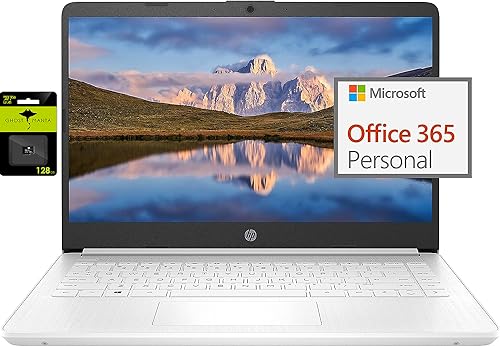
I use a top-of-the-line Mac Studio for my professional photo work, but for organizing and managing my own photo collections on the go, I have a simple $250 HP laptop. It’s cheap, reliable, and does everything I need for file transfers and basic organizing. I’ll link mine below in case you want to check it out.
☁️ Free Cloud Storage Options
Cloud storage is one of the easiest (and safest) ways to back up your photos without spending extra money.
- Amazon Photos – If you have an Amazon Prime account, you already have unlimited photo storage for free. You can upload your scanned prints and digital photos right to your Amazon Photos account and access them from anywhere.
Other free options include Google Photos (15GB free) or Dropbox Basic (2GB free) – great places to store a small set of your most important photos.
🧰 Free Photo Organizing Software
There are a few great tools that won’t cost you a dime but make sorting and managing photos much easier.
Adobe Bridge (Free)
This one’s been my go-to for 20 years. Adobe Bridge is totally free (you just need an Adobe ID) and it’s amazing for organizing, previewing, and renaming large batches of photos. You can easily reorder files and see everything at once without opening separate folders.
And if you’re looking for tutorials, check out my YouTube channel where I share guides on organizing photos step-by-step.
And if you need even more help, check out my course Save Your Story. It will walk you through every step of taking a lifetime of old photos and getting them all organized into one place. And let’s be honest, sometimes the best way to keep things affordable is to just not make a bunch of errors as you go! And that’s what I’ll do, when I walk you step by step through the process. Check it out here!
❤️ Final Thoughts
You don’t need expensive gear to preserve priceless memories. Start with what you have, take advantage of free tools, and make steady progress. Whether you’re using a library scanner or an affordable hard drive, every photo you digitize and safely store is one less memory at risk.
If you found these tips helpful, make sure to subscribe to my newsletter and check out my free Photo Resource Guide, where I share my favorite budget-friendly tools and gear for photo organization.
👉 Want to join the photo organizing CRUISE? This fun getaway is set for February 2026 and YOU are invited to join! Check out The Great Photo Voyage and be sure and sign up soon, space is limited!
👉 Grab my free Photo Resource Guide – it’s packed with tools, apps, and simple steps to get started.
👉 Check out my book, Beyond the Storm – a powerful blend of true stories and practical advice for safeguarding your photos.
Or follow along on social media! Check out Instagram and YouTube to get my latest information.