
A Real-Life Photo Panic
I recently spoke with a woman who was standing exactly where you might be right now. She had inherited piles of her parents’ photos years ago, and there they still sat… untouched… in her garage (gasp). Over the years, she’d even added her own photo stash — plus her kids’ — until the collection was practically haunting her every time she opened the garage door.
The breaking point came when she decided to downsize. Her move-out date was fast approaching, and she was suddenly staring down a mountain of boxes with nowhere to hide them. When she reached out to me, I could tell she was panicking. Time was up. She knew that if she didn’t deal with these photos now, they might never be sorted, enjoyed, or preserved.
As we talked, something shifted. Once she broke the task into small, doable chunks, it wasn’t nearly as overwhelming as she feared. She set aside a couple of days to work on it — no “I’ll deal with this later” allowed. And here’s the magic: when she was done, she had about half the number of photos she started with… yet she felt like she had more to enjoy. By clearing away the clutter, the treasures could finally shine.
She told me it felt like a weight had been lifted. And that’s when I said, “Don’t stop now!”
The Step That Makes People Quit
Once you’ve sorted, there’s one more step you can’t skip — getting a digital copy of every print you keep.
Why?
Because a photo that exists only as one fragile print is at the mercy of both disaster and time. I’ve seen precious images fade beyond recognition just from sitting in a box for decades. A digital copy doesn’t replace the original, but it does make sure the memory is safe — even if something happens to the print.
4 Ways to Scan Your Photos
1. Phone App Scanners
Great for: Casual projects, scanning anywhere without extra equipment.
Examples: Photomyne (paid, iOS & Android)
Pros:
- Always with you — just use your phone camera.
- No extra cost if you choose a free app.
- Quick sharing to cloud storage or family members.
Cons:
- Slower for large batches.
- Image quality depends on phone camera and is generally not as good as a traditional scanner.
- You may encounter glare on pictures.
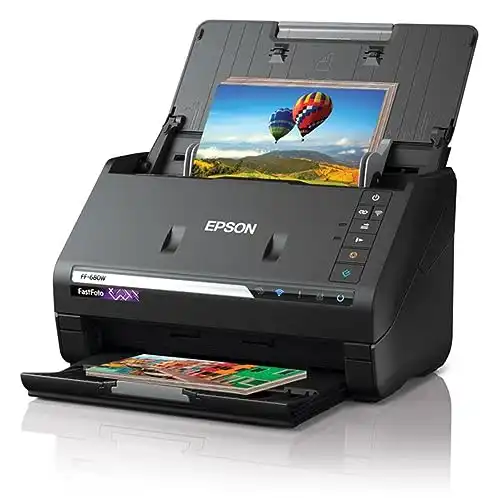
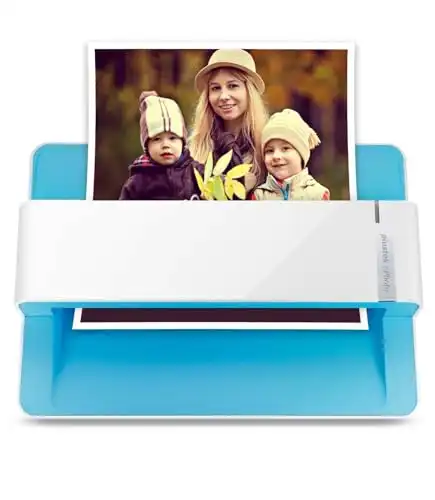
2. Feeder Scanners
Great for: Large batches of loose prints when speed matters.
Examples: Epson FastFoto FF-680W, Canon ImageFORMULA R40
Pros:
- Scans dozens of photos per minute.
- Front-and-back scanning for notes or dates written on the back.
- Consistent quality for standard-sized prints.
Cons:
- Not ideal for fragile or curled photos.
- Higher upfront cost.
- Needs a safe feeding process to avoid jams.
|
|
|
|
|
|
- Auto feeds 30+ pictures at a time
- Extremely fast scan speed
- Good quality scan
- Auto color correction
- Scans front and back
- Software is easy to use
- Price
- Most affordable feeder scanner
- Sleek design
- Good quality scan
- Faster than a flatbed scanner
- Manual document feeder
3. Flatbed Scanners
Great for: Delicate, oversized, or non-standard items like albums, scrapbooks, and documents.
Examples: Epson Perfection V600, Canon CanoScan LiDE 400
Pros:
- Gentle on old or fragile items.
- Can scan slides, negatives, and odd sizes.
- High resolution for archival quality.
Cons:
- Slower, as each scan is done one at a time.
- Bulky compared to phone apps.
- Not as convenient for everyday scanning.

4. Hire a Professional Service
Great for: When you have more photos than time, or want top-quality results without lifting a finger.
Examples: Pixologie, Clicking with Kristen
Pros:
- Hands-off — they do all the work for you.
- Professional equipment produces consistent results.
- Many services also handle slides, negatives, and VHS tapes.
Cons:
- Can be expensive, especially for large collections.
- You’ll need to ship or drop off originals (consider insurance and tracking).
- Less control over the process compared to DIY.
Quick Decision Guide: Which Scanning Method is Right for You?
| If this sounds like you… | Best Option | Why |
|---|---|---|
| “I just want to scan a few as I stumble across them.” | Phone App Scanner | Free or inexpensive, no extra equipment, easy to share instantly. |
| “I have boxes of loose prints and I want this done FAST.” | Feeder Scanner | Scans dozens of photos per minute, consistent quality for standard sizes. |
| “My photos are fragile, curled, or in albums I can’t take apart.” | Flatbed Scanner | Gentle, high resolution, works with odd sizes and delicate items. |
| “I have zero time (or patience) and want someone else to do it all.” | Hire a Professional Service | Hands-off, professional equipment, can also handle slides, negatives, and video. |
And if you’re looking for even more help getting the most enjoyment out of your photos, check out the other ways we can connect:
👉 Grab my free Photo Resource Guide – it’s packed with tools, apps, and simple steps to get started.
👉 Check out my book, Beyond the Storm – a powerful blend of true stories and practical advice for safeguarding your photos.
👉 Want to join the photo organizing CRUISE? This fun getaway is set for February 2026 and YOU are invited to join! Check out The Great Photo Voyage and be sure and sign up soon, space is limited!
Or follow along on social media! Check out Instagram and YouTube to get my latest information.