
Oh, the irony.
I shared a post on Instagram about protecting our phone photos from technology failing us. More than 250 people asked me to send them links to the products I recommend. And wouldn’t you know it, there was an error in the auto reply I set up. Those messages never went out. That one might have been user error… Or maybe tech malfunction… But either way, it didn’t work.
If there’s one thing I’ve learned about technology, it’s that it’s absolutely wonderful when it works. And incredibly frustrating when it doesn’t.
So I decided to give all of my photo backup product recommendations a permanent home right here in a blog post.
One of the questions I get asked most often is what products I personally use and recommend for keeping photos safe. And with so many options, technical terms and wildly different price points, I know it can be overwhelming.
I’m going to keep this simple.
Some of the links below are affiliate links, which means I may earn a commission if you make a purchase, at no additional cost to you.
1. Have an Additional Copy of Your Photos in the Cloud
If you’re relying solely on iCloud to keep your photos safe, the first thing I suggest doing is getting an additional copy of your photos into another cloud storage service.
One of my favorites is Amazon Photos. If you’re already an Amazon Prime member, you have access to unlimited full-resolution photo storage as part of your membership. (Video storage is limited.)
You can download the Amazon Photos app to your phone and set it up to automatically upload your photos.
I’m not suggesting you stop using iCloud. I’m suggesting you don’t make it the only place your photos live.
2. Keep a Copy of Your Photos in Your Own Home
As much as I appreciate the convenience of cloud storage, I also want to have a copy of my photos in my own possession.
One of the easiest ways to do this is with an external hard drive that plugs into your computer. You can use it to store copies of your photos and videos without having to rely on an internet connection or a cloud storage company to access them.
There are a lot of options out there, but this is the one I use:
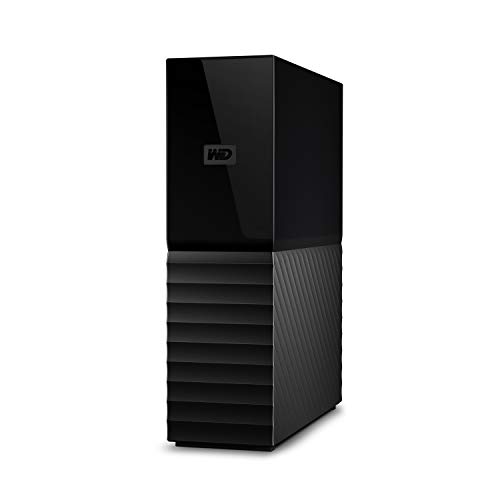
This one is another that I have. It’s smaller, more durable and portable. A lot of my Photo Manager friends recommend this one. It’s another great option. Either will work well for backing up your photos.

3. Back Up Your Phone Photos Without a Computer
What if you don’t have a computer? Or what if you simply don’t want to add that extra step to the process?
There are some really great little devices that allow you to save photos directly from your phone to an external storage device.
These are particularly convenient for those of us who take most of our everyday photos with our phones. Just be sure to choose a device that’s compatible with your particular phone.
Here is one that I’ve personally used.
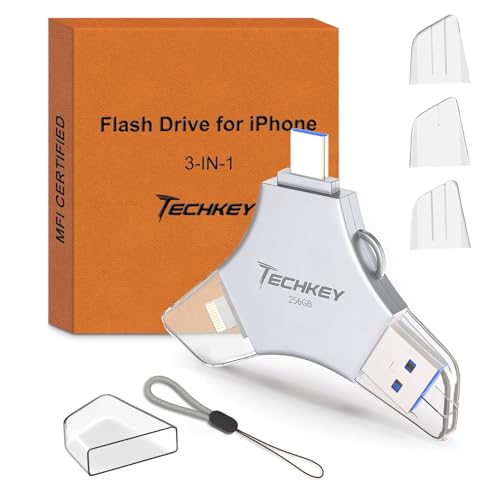
You’ll notice there’s a pretty significant price difference between some of these products, and much of that comes down to how much they can hold. The 4TB external hard drive I recommend has roughly 16 times the storage capacity of a 256GB flash drive. A larger external hard drive is a great option for keeping years and years of photos and videos, while a smaller flash drive that plugs directly into your phone is an affordable and convenient way to make an additional copy of your everyday photos. One isn’t necessarily better than the other. It really depends on the size of your photo collection, how you want to access your photos and what makes the process easiest for you. I’d much rather see you spend $30 on something you’ll actually use than a few hundred dollars on something that sits in a drawer.
One Last Thing
The goal here isn’t to move your photos from one place to another. It’s to have copies of your photos in multiple places.
If something happens to your phone, your cloud account or even your external hard drive, you want to know that those photos still exist somewhere else.
You don’t need the most expensive technology or the most elaborate system. You just need a system that works for you and that you’ll actually use.
Because the whole point of taking all these pictures is to have them to look back on someday.
More help keeping your photos safe
The Simple Photo Backup System I Use for My Own Pictures
iCloud Went Wonky. And I Have Some Thoughts.
The Truth About Storing Photos in the Cloud
Want more of my favorite photo resources?
If you found this helpful, you’re going to love my free Photo Resource Guide!
I spend a ridiculous amount of time researching, testing and talking to experts about all things photo-related. I’ve put my favorite resources together in one guide, including products, apps, tools and services to help you organize, preserve, protect and enjoy your pictures.
It’s the kind of resource I wish every picture person had handy. And it’s completely free!
Get your free Photo Resource Guide here!

Let’s stay connected!
👉 Come along on the Great Photo Voyage! Join fellow picture people for a week of photo organizing, photo walks, and conversations about our favorite thing. Find out more about the Great Photo Voyage.
👉 Grab my free Photo Resource Guide – it’s packed with tools, apps, and simple steps to get started.
👉 Check out my book, Beyond the Storm – true stories and practical advice for safeguarding your photos.
Find more picture person thoughts and tips on Instagram and YouTube.
